Berkas:EfieldTwoOppositePointCharges.svg
Loncat ke navigasi
Loncat ke pencarian
Ukuran pratayang PNG ini dari berkas SVG ini: 619 x 438 piksel resolusi uweewo:320 x 226 piksel | 640 x 453 piksel | 1.024 x 725 piksel | 1.280 x 906 piksel | 2.560 x 1.811 piksel
Berkas asli (Berkas SGV, nominal 619 x 438 piksel, damango berkas:187 KB)
Limbu'o
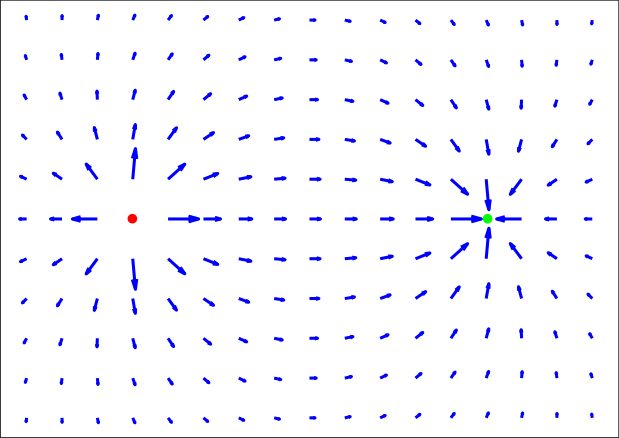
| Deskripsi | Illustration of the electric vectorfield surrounding two opposite point charges. Red is positive, green is negative. |
| Tanggal | |
| Bungo | Own work. Vectorfield plotted in Matlab using the 'quiver' function. Exported in Encapsulated Postscript (EPS) format; converted to Scalable Vector Graphics (SVG) format in GSView using 'plot-svg' via GNU libplot. Added circle drawings in Inkscape (GNU General Public License). |
| Ta ohu'uwo | Mfrosz |
| Ijini (Popohunawa ulangi berkas botiye) |
Free for use by anyone for anything, but please give credit to Wikimedia or Wikipedia. |
| SVG genesis |


Tayadu lisensi

|
Saya, pemegang hak cipta karya ini, merilis karya ini ke domain umum. Lisensi ini berlaku di seluruh dunia. Di sejumlah negara, tindakan ini tidak memungkinkan secara sah; bila seperti itu: Saya memberikan siapa pun hak untuk menggunakan karya ini untuk tujuan apa pun, tanpa persyaratan apa pun, kecuali yang ditetapkan oleh hukum. |
Riwāyati lo berkas
Klik to tanggal/wakutu momilohe berkas to saa'ati botiye.
| Tanggal/Wakutu | Gambari kiki'o | Dimensi | Ta ohu'uwo | Lo'iya | |
|---|---|---|---|---|---|
| baharu | 12 Agustus 2006 11.41 | | 619 × 438 (187 KB) | wikimediacommons>Mfrosz | {{Information |Description=Illustration of the electric vectorfield surrounding two opposite point charges. Red is positive, green is negative. |Source=Own work. Vectorfield plotted in Matlab using the 'quiver' function. Exported in Encapsulated Postscrip |
Berkas u pilopohuna
Diya'a halaman u owumbuta ode berkas botiye
